Make a printable family fan chart
A fan chart puts one person at the centre and their ancestors in rings around them: parents in the first ring, grandparents in the second, great-grandparents in the third. Each ring doubles, so a five-generation fan holds thirty ancestors in a half circle that fits on one sheet. It shows at a glance which lines are researched and which stop short.
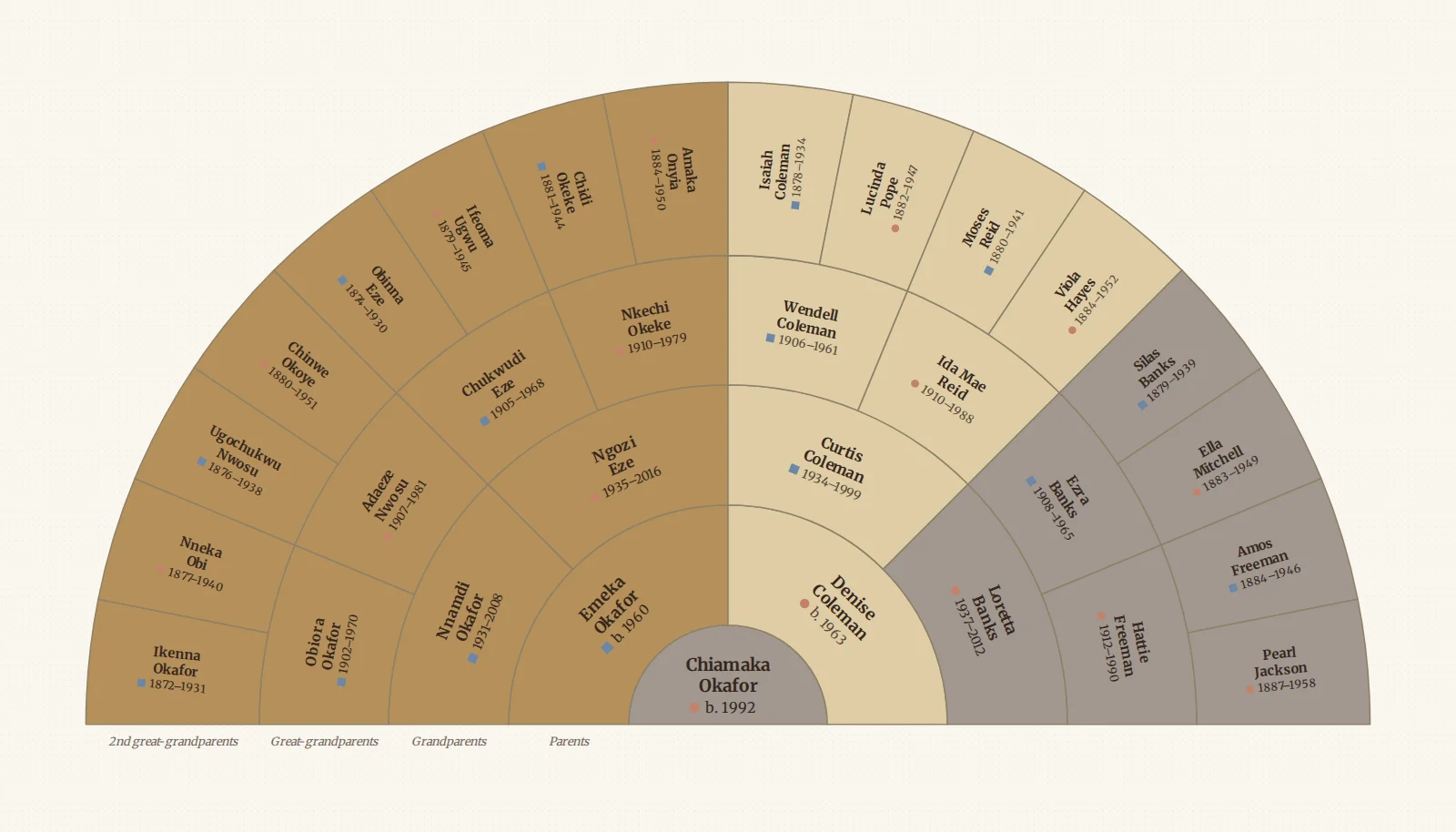
Draw My Tree draws a fan chart from the tree you already have, or from a GEDCOM file exported from another app, and exports it as a PDF, SVG or PNG. It also draws two related charts: a descendant fan, with children and grandchildren in the rings, and an hourglass, with the ancestors above and the descendants below.
Try it as a guest: type a few names, or import a GEDCOM, and switch the layout to a fan. No account is needed for up to 50 people.
Step 1: get your people in
You need a tree to draw from. Any of these works:
- Type them in. Start with yourself, then add parents and grandparents with the + on each card. Building your tree covers it.
- Import a GEDCOM. Ancestry, MyHeritage, Family Tree Maker, RootsMagic and most other genealogy programs export one. Import a GEDCOM has the click paths for each.
Step 2: switch to the fan
- Open Look on the rail.
- Under Layout, choose Fan chart.
- Select the person who should sit in the centre. Click them on the fan, find them with search, or pick them in the People list, and the fan moves to them.
Until you choose someone, the fan opens on the person your tree was started from, usually you. If they have no relatives to fill the fan (an ancestor fan around the oldest person in the tree, say), it opens on the person with the most recorded ones instead.
Step 3: choose the fan
With Fan chart chosen, these settings appear under Layout options:
- Show: Ancestors (the classic fan), Descendants (children in the first ring, grandchildren beyond, eldest on the left) or Both, an hourglass with ancestors over the top and descendants underneath.
- Generations: two to seven rings, counting the centre. Seven rings hold six generations of ancestors.
- Sweep: a half circle, three quarters, or a full circle. The wider the sweep, the more room the outer names get. Both always takes the full circle.
- Shade cells: by family line (your father's side and your mother's side in the look's two accent colours, each grandparent's line a stronger or paler strength), by gender (needs Colour by gender on in Look), by generation, by birthplace (each country of birth in its own colour, with a key beside the fan and on the export), or plain.
The colours, typeface and background come from the rest of the look, so a preset that suits your tree suits its fan too. Portraits show in the centre and the first ring when photos are on.
When cousins married, the same ancestor belongs in more than one cell. The fan draws every place they belong, writes the repeats in italic, and on screen outlines all of them when you point at one.
Blank cells. On a tree you can edit, a dashed cell with a + is a parent nobody has recorded yet; select it to open the add-relative menu and choose the parent to add. These cells are left out of an export, so the print shows only what you know.
Step 4: export or print it
Open Export on the rail and choose A print for a guided path to a PDF or PNG, or A picture to share. All export options has every format, the size and Orientation. The preview shows the fan exactly as the file will come out.
- PDF for printing. It is vector, so it prints sharp at any size. A half-circle fan fits a wide page well; leave Orientation on Auto in All export options and it turns to suit.
- SVG if a print shop or a design tool asks for it.
- PNG or JPEG for a message, a slide, or a social post.
Pick a size in A print or All export options: Letter, A4, Tabloid, A3 or A2; a poster at 18 × 24, 24 × 36 or 36 × 48 in; a photo-book page; or a custom size. A poster-sized PDF can also be split across Letter or A4 sheets to tape together. Print your family tree has every option.
How many generations fit on a page
Every ring has twice as many cells as the one inside it, so the outer rings fill up fast. As a guide:
- A Generations setting of four reads comfortably on Letter or A4, and five fits with smaller names.
- A setting of six wants Tabloid or A3.
- A setting of seven wants a poster. On a small sheet the outer cells are too narrow for full names, so names there are shortened, down to initials if need be, rather than spilling out of the cell.
On screen, each cell's label holds the full name, so shortening affects only the print.
Frequently asked questions
Is it free? Drawing the fan is free, as a guest or with a free account, and a guest can download a watermarked PNG at screen size. A free account can also print a fan of up to 5 generations from one person (an hourglass fan, that many each way) on Letter or A4, as a PDF or PNG, with a small "Made with Draw My Tree" credit line instead of the watermark. A fan of more than 5 generations, a print-ready SVG, poster sizes, a full-resolution image without the watermark, and the whole tree come with a one-time Keepsake for that tree, or with the Family Plan for every tree. Prices are on the pricing page.
Are the names curved along the rings? No. Names are written straight: along the ring in the inner rings, and along the radius in the outer ones, where cells are narrower than they are deep. No name is ever upside down.
Can I show siblings or spouses on a fan? A fan shows direct lines only. For a chart with everyone, switch the layout back to Top to bottom or Left to right, or turn on the numbered pedigree chart.
Is there a blank fan chart to fill in by hand? Yes: a free blank five-generation fan chart in Letter and A4, numbered the same way as the pedigree chart. Type the same names in here to get a fan you can reprint whenever you add someone.
Can I share it without printing? Yes. When the tree's look is a fan, a share link can open the fan on a person you choose, so relatives see the same chart in their browser. The public read-only link comes with the Family Plan or a Keepsake. Inviting family by email to view is free: 3 people on a free account, and up to 10 on a tree with a Keepsake. Only inviting people to edit needs the Family Plan.
What to read next
- Make a printable pedigree chart: the same ancestors, as boxes and lines.
- Make a family timeline chart: everyone's life as a bar on one line of years.
- Print an Ahnentafel ancestor report: the same ancestors, numbered, as a list.
Last updated October 11, 2026 by Prescott Bros LLC, the makers of Draw My Tree.