Make a printable pedigree chart
A pedigree chart shows one person's direct ancestors and nobody else: their parents, their grandparents, and so on back, each generation in its own column or row. Leaving off siblings, aunts, uncles and cousins keeps it small enough to read. Genealogists start a research file with one, and most family history societies ask for it.
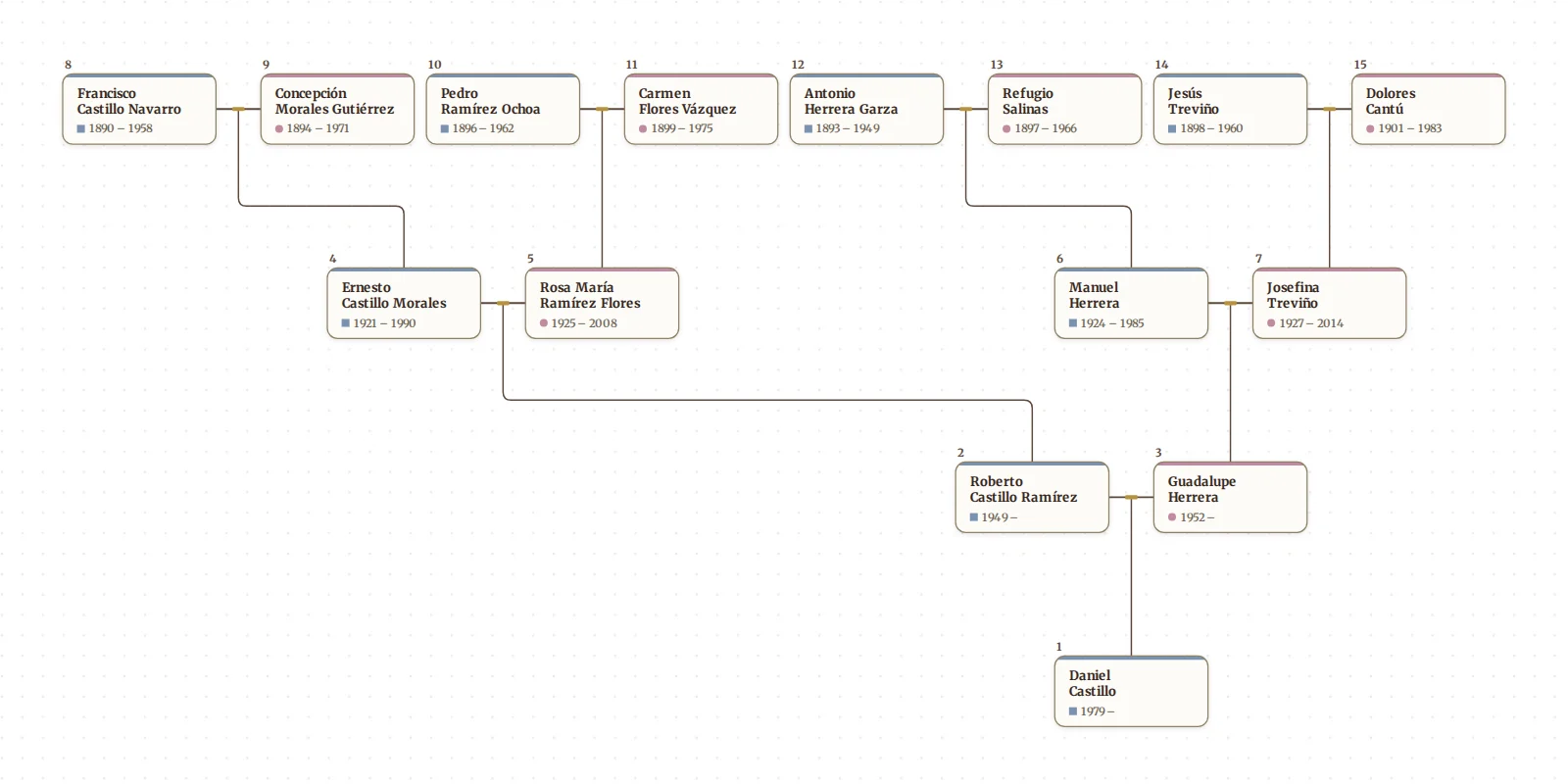
Draw My Tree turns any tree into a numbered pedigree chart with one switch, and exports it as a PDF, SVG or PNG for printing.
Try it as a guest with a few names or a GEDCOM file. No account is needed for up to 50 people.
How the numbers work
Every card in the pedigree carries a number, the way genealogists have counted ancestors for centuries:
- 1 is the person the chart starts from.
- A father is twice his child's number; a mother is twice plus one.
- So 2 and 3 are the parents, 4 to 7 the grandparents, 8 to 15 the great-grandparents.
Where each couple is a father and a mother with their genders recorded, every man except the first person is even and every woman is odd. A parent whose gender is not recorded, or one of two parents of the same gender, takes whichever of the two numbers is free. From any number you can find a parent (double it) or a child (halve it and drop the remainder) without looking at the chart. When cousins married and one ancestor belongs in two places, their card carries both numbers. The same numbering is used by the Ahnentafel report, which lists these ancestors as text.
Step 1: get your people in
Type the family in, starting with yourself and adding parents with the + on each card (Building your tree), or import a GEDCOM from Ancestry, MyHeritage, Family Tree Maker, RootsMagic or any other program (Import a GEDCOM).
Step 2: turn on the pedigree
- Open Look on the rail.
- Under Layout, choose Top to bottom or Left to right.
- Open Layout options and turn on Pedigree.
- Select the person the chart should start from. Anyone you select becomes number 1.
- In Layout options, set Pedigree generations, two to seven, counting the person it starts from.
For the classic printed form, with the person on the left and the ancestors branching to the right, choose Left to right, then in Layout options turn on Oldest generation on the right (the Layout tile then reads Right to left).
The cards keep the rest of your look: card shape, typeface, colours, whether photos and dates show. The Old fashioned preset gives it the look of a formal printed chart.
Step 3: export or print it
Open Export on the rail and choose A print. The last step shows the page exactly as it will print. All export options has every format, the size and Orientation.
- PDF for printing, at any size; text and lines stay sharp.
- SVG for a print shop or a design tool, PNG or JPEG for a message or a slide.
- Size: Letter, A4, Tabloid, A3 or A2, a poster, a photo-book page, or a custom size. Under the preview the panel says what size the names will print at and warns you if they will be too small to read.
A four-generation pedigree (person, parents, grandparents, great-grandparents) fits Letter or A4. Five, with sixteen people in the last column, wants Tabloid or A3. Six or seven, with up to 64 in the last column, want a poster or a PDF split across sheets. The name-size note under the preview is more reliable than this rule of thumb. Hiding photos makes every card smaller, so more generations fit on the same paper. Print your family tree has every size and option.
Pedigree chart or fan chart?
They show the same people. A pedigree chart is boxes and lines, easy to read and annotate, and it is the form most archives and societies use. A fan chart puts the same ancestors in rings around the person; it fits more generations into a compact shape. You can export both from one tree.
Frequently asked questions
Is it free? Drawing the pedigree is free, and a guest can download a watermarked PNG at screen size. A free account can also print a pedigree of up to 5 generations from one person on Letter or A4, as a PDF or PNG, with a small "Made with Draw My Tree" credit line instead of the watermark. A pedigree of more than 5 generations, a print-ready SVG, poster sizes, full-resolution images without the watermark, and the whole tree come with a one-time Keepsake for that tree, or with the Family Plan for every tree. Prices are on the pricing page.
What about a blank pedigree chart to fill in by hand? For a blank form, download our free blank pedigree charts, four or five generations, in Letter or A4; type the same names in here to get a chart you can reprint whenever you add someone.
Can I show siblings too? Not on the pedigree, which is direct ancestors only. Turn Pedigree off to draw the whole family, or use a focus filter in the Filter panel to show one person's ancestors or descendants.
Are living people shown? On your own export, yes, unless you choose Leave out living people in the Export panel. A public share link hides people who appear to be living unless you say otherwise.
What to read next
- Make a printable family fan chart
- Print an Ahnentafel ancestor report: the same numbered ancestors, as a list.
- Print a family group sheet: one couple and their children, on a page.
- Make a printable descendant chart: the other direction, one ancestor and everyone after them.
Last updated October 11, 2026 by Prescott Bros LLC, the makers of Draw My Tree.